that an ANOVA is a test on top of a regression model, how it measures and tests the improvement of model fit, and how to partition the model into custom blocks (Section 3.1, Section 3.2.2, Section 3.1.2);
why the order of the predictors matters for collinear predictors, and how to choose between type I, II and III ANOVA (Section 3.2.3, Section 3.2.3.2);
why contrast coding and centering change type III results for terms in interactions, and how emmeans gives results that do not depend on the coding, including conditional effects, i.e. effects of one predictor at a given level of the other (Section 3.2.4, Note 3.1);
why raw variance fractions are too high for terms with many df (Section 3.2.5).
Workflow steps (Chapter 12): step 3 (coding of factors), step 6 (tests on the fitted model).
Prerequisites: the linear model and its handling of categorical predictors (Chapter 2, Section 2.6).
3.1 The idea of ANOVA
ANOVA stands for ANalysis Of VAriance. We already ran a first ANOVA for a categorical predictor in the chapter on linear regression (Section 2.6.2); here, we look at what it does in more detail.
The problem with explaining ANOVA is that the term is fraught with historical meanings and explanations that are no longer relevant. It used to be that ANOVA is a stand-alone method that you use for experimental designs with different treatments, that ANOVA assumes normal distribution and partitions sum of squares, that there are repeated-measure ANOVAs and all that (today, such designs are fitted as mixed models, see Tip 4.1), and those varieties of ANOVA partly still exist, but in general, there is a much simpler and general explanation of ANOVA:
Modern explanation: ANOVA is not a statistical model, but a hypothesis test that can be performed on top of any regression model. What this test is doing is to measure how much model fit improves when a predictor is added, and if this improvement is significant.
3.1.1 An example
As an example, here is an ANOVA performed on the fit of a linear model, with the function anova() (for an lm, it gives the same table as summary(aov())):
fit =lm(Ozone ~ Wind + Temp, data = airquality)anova(fit)
Analysis of Variance Table

Response: Ozone
           Df Sum Sq Mean Sq F value    Pr(>F)
Wind        1  45284   45284  94.808 < 2.2e-16 ***
Temp        1  25886   25886  54.196 3.149e-11 ***
Residuals 113  53973     478
---
Signif. codes:  0 '***' 0.001 '**' 0.01 '*' 0.05 '.' 0.1 ' ' 1
In the standard ANOVA for the LM, model fit is measured by the reduction in residual sum of squares. Let’s look at the example above. In the ANOVA table above, we (virtually) start with an intercept only model. Now, what the table tells us is that adding Wind to the model reduces the Sum Sq. by 45284, and adding also Temp reduces the Sum Sq by another 25886, which leaves us with 53973 residual sum sq. From this, we can also conclude that the total sum of squares of the response is 53973 + 25886 + 45284 = 125143. Let’s check this:
sum((fit$model$Ozone -mean(fit$model$Ozone))^2)
[1] 125143.1
Thus, we can compute the fraction of variance attributed to each model component and to the residuals (note the last entry is the unexplained remainder, not an explained component):
totalSumSq =45284+25886+53973# total sum of squares45284/totalSumSq # R2 Wind
Moreover, the ANOVA table performs tests to see if the improvement of model fit is significant, compared to the model without the respective term. This is important because adding a predictor always improves model fit, even if it has no effect (we will discuss this in more detail in the chapter on model selection, in particular Section 8.2.1).
To interpret the p-values, consider that H0 = the simpler model is true, thus we test if the improvement of model fit is higher than what we would expect if the predictor has no effect.
3.1.2 Customizing the partitioning
An important thing to note is that in an ANOVA, you don’t need to always separate one predictor after the other, you can also work in blocks of predictors, or entire components of the model.
There are a number of cases where this makes a lot of sense. A typical example is, if you are fitting a polynomial of a predictor. Consider, for example, the following regression (we write the polynomials with poly(), see Caution 2.1):
fit =lm(Ozone ~poly(Wind, 2) +poly(Temp, 2), data = airquality)
Maybe, we would like to ask how much variance is explained by Wind + Wind^2, and how much by Temp + Temp^2. In this case, we can perform custom ANOVA, using the anova() function that you may have seen in the solution of the exercise in Section 2.5.2, to compare nested models (for an lm with an F-test, which is a likelihood ratio test, see Section 3.2.2).
m0 =lm(Ozone ~1, data = airquality)m1 =lm(Ozone ~poly(Wind, 2), data = airquality)m2 =lm(Ozone ~poly(Wind, 2) +poly(Temp, 2), data = airquality)anova(m0, m1, m2)
Analysis of Variance Table

Model 1: Ozone ~ 1
Model 2: Ozone ~ poly(Wind, 2)
Model 3: Ozone ~ poly(Wind, 2) + poly(Temp, 2)
  Res.Df    RSS Df Sum of Sq      F    Pr(>F)
1    115 125143
2    113  64360  2     60783 81.397 < 2.2e-16 ***
3    111  41445  2     22915 30.686 2.464e-11 ***
---
Signif. codes:  0 '***' 0.001 '**' 0.01 '*' 0.05 '.' 0.1 ' ' 1
Which separates the R2 between Wind and Temp, but not between the linear and quadratic effects of the two.
3.2 Fundamental issues in ANOVA
There are five basic problems that we will come back again when generalizing this principle across a range of models:
How should we measure “improvement of model fit”. Traditionally, improvement is measured by the reduction of the residual sum of squares, but for GLMs, we will have to expand this definition
How should we test if the improvement in fit is significant? For simple models, this is not so much a problem
How should we partition variance if predictors are collinear, and thus the order in which predictors are included matters
Related to the previous point, for categorical predictors, the choice of contrasts changes the results of the type III ANOVA (see Section 3.2.4).
Should we correct for complexity?
Let’s look at the problem one by one:
3.2.1 Measuring model fit
The definition of model fit via sum of squares makes sense as long as we work with linear models.
For GLMs, this definition doesn’t make sense any more. A number of so-called pseudo-R2 metrics have been proposed. Most of them are based on the likelihood (as a measure of model fit) and try to recover as far as possible the properties of an R2 for the linear model.
A common metric is McFadden pseudo-R2, which is defined as 1-[LogL(M)/LogL(M0)], where M is our model, and M0 is an intercept only model. However, many other definitions of “importance” are possible, and in the broadest sense, you could say the principle of ANOVA is to separate out the importance of different predictors or model components, however this importance is measured.
3.2.2 Testing if the improvement is significant
The general test behind the ANOVA, and behind all comparisons of nested models in this book, is the likelihood ratio test (LRT). An LRT compares two nested models, M0 (simpler) and M1 (M0 is a special case of M1, e.g. M1 without one predictor):
H0: M0 is true
Test statistic: \(-2 \log \frac{L(M_0)}{L(M_1)} = -2 \left[\log L(M_0) - \log L(M_1)\right]\), i.e. minus twice the difference in maximized log-likelihoods
Under H0 and relatively broad regularity conditions, the test statistic is asymptotically chi-squared distributed, with df = difference in the number of free parameters of the models M1, M0
The test in our example before is an F-test, which anova() uses for linear models with normal residuals. The F-test is a special case of the LRT for these models, with an exact instead of an approximate distribution (for the reason, see Tip 3.1). How LRTs are used to select between models is discussed in the chapter on model selection (Section 8.2.1).
Tip 3.1: Why the F-test is a likelihood ratio test
Both the F-test and the chi-squared LRT rest on the same likelihood ratio (defined above). For a linear model with normal residuals, the maximized log-likelihood depends on the data only through the residual sum of squares, \(\log L = -\frac{n}{2} \log(RSS/n) + \text{const}\). The LRT statistic for two nested models is therefore
\[-2 \log \frac{L(M_0)}{L(M_1)} = n \log \frac{RSS_0}{RSS_1} = n \log \left(1 + \frac{q \, F}{n - p_1}\right) \quad \text{with} \quad F = \frac{(RSS_0 - RSS_1)/q}{RSS_1/(n - p_1)},\]
where \(q\) is the number of additional parameters in M1 and \(p_1\) the number of regression coefficients of M1. The LRT statistic is a monotone function of F, so both tests rank all possible results in the same way: the F-test is an LRT. They differ only in the reference distribution. The chi-squared distribution of the LRT is a large-sample approximation, while the F distribution is exact for linear models with normal residuals, because it accounts for the fact that the residual variance is estimated. This is why anova() uses the F-test for lm (and for GLMs with an estimated dispersion, e.g. Gamma), and the chi-squared LRT for Poisson and binomial GLMs and for comparisons of mixed models, for which no exact distribution exists. For nonlinear least squares (Chapter 5), anova() also reports an F-test, but there both distributions are approximations.
# both models must use the same rows: remove NAs in the variables useddatCC = airquality[complete.cases(airquality[, c("Ozone", "Temp", "Wind")]), ]mF0 =lm(Ozone ~ Temp, data = datCC)mF1 =lm(Ozone ~ Temp + Wind, data = datCC)anova(mF0, mF1) # F-test
Analysis of Variance Table

Model 1: Ozone ~ Temp
Model 2: Ozone ~ Temp + Wind
  Res.Df   RSS Df Sum of Sq      F   Pr(>F)
1    114 64110
2    113 53973  1     10137 21.223 1.08e-05 ***
---
Signif. codes:  0 '***' 0.001 '**' 0.01 '*' 0.05 '.' 0.1 ' ' 1
LR =as.numeric(2* (logLik(mF1) -logLik(mF0)))LR # identical to nrow(datCC) * log(1 + F / (nrow(datCC) - 3))
[1] 19.96533
pchisq(LR, df =1, lower.tail =FALSE) # LRT with chi-squared approximation
[1] 7.885929e-06
With 116 observations, both p-values are practically the same; for small samples, the F-test is the one to use.
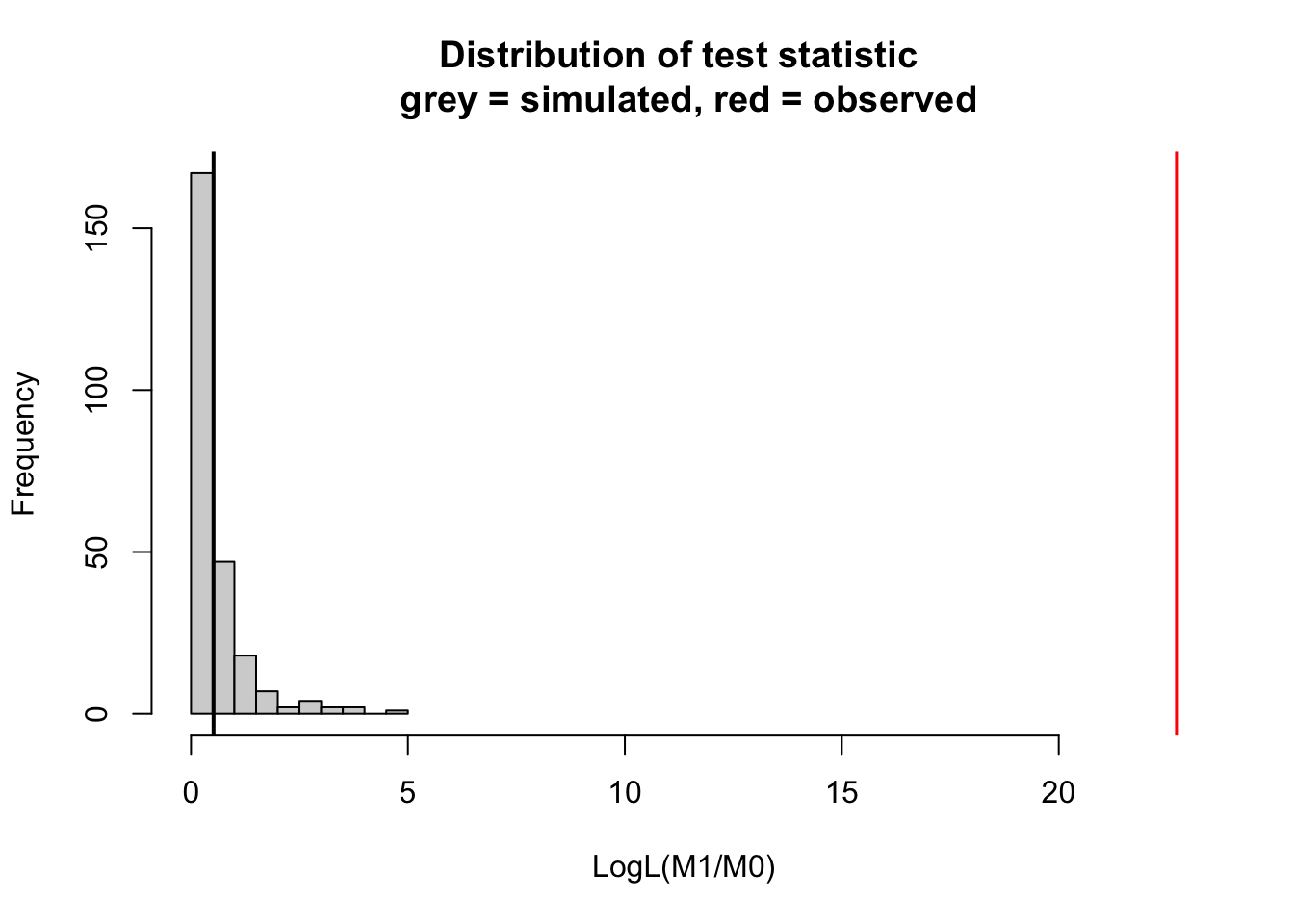
This setup works for LMs and GLMs, but runs into problems when the definition how many df a model has is unclear. This is in particular the case for mixed models. In this case, one can resort to simulated LRTs. Simulated LRTs are a special case of the bootstrap (see the section on nonparametrics and the bootstrap, Section 2.12, in particular Section 2.12.2). More precisely, they are a parametric bootstrap: instead of assuming that the test statistic follows a chi-squared distribution (point 3 above), we generate its distribution under H0 by simulating new data from the fitted model M0. Because this method is crucial for mixed models, I want to shortly explain it already here:
Simulate data from H0 (= the fitted model M0)
Re-fit M0 and M1, and calculate likelihood ratios
Repeat n times to get an idea about the expected increase in likelihood when moving to M1 under the assumption that M0 is correct
library(DHARMa)m0 =lm(Ozone ~ Wind , data = airquality)m1 =lm(Ozone ~ Wind + Temp, data = airquality)simulateLRT(m0, m1)
    DHARMa simulated LRT

data:  m0: m0 m1: m1
LogL(M1/M0) = 22.723, p-value < 2.2e-16
alternative hypothesis: M1 describes the data better than M0
# for comparisonanova(m0, m1)
Analysis of Variance Table

Model 1: Ozone ~ Wind
Model 2: Ozone ~ Wind + Temp
  Res.Df   RSS Df Sum of Sq      F    Pr(>F)
1    114 79859
2    113 53973  1     25886 54.196 3.149e-11 ***
---
Signif. codes:  0 '***' 0.001 '**' 0.01 '*' 0.05 '.' 0.1 ' ' 1
A simulated p-value cannot be smaller than about 1/(n+1), where n is the number of simulations (250 by default in simulateLRT(), i.e. about 0.004). If none of the simulations reaches the observed value, report p < 1/(n+1) rather than the p-value printed by the function.
3.2.3 Collinearity means that order matters
Another key problem in ANOVA, and a source of much confusion, is how to deal with the fact that often, the order in which model components are added matters. Compare the results of our previous ANOVA with this one, where I only flipped the order of Temp and Wind:
m1 =lm(Ozone ~ Wind + Temp, data = airquality)m2 =lm(Ozone ~ Temp + Wind, data = airquality)anova(m1)
Analysis of Variance Table

Response: Ozone
           Df Sum Sq Mean Sq F value    Pr(>F)
Wind        1  45284   45284  94.808 < 2.2e-16 ***
Temp        1  25886   25886  54.196 3.149e-11 ***
Residuals 113  53973     478
---
Signif. codes:  0 '***' 0.001 '**' 0.01 '*' 0.05 '.' 0.1 ' ' 1
anova(m2)
Analysis of Variance Table

Response: Ozone
           Df Sum Sq Mean Sq F value    Pr(>F)
Temp        1  61033   61033 127.781 < 2.2e-16 ***
Wind        1  10137   10137  21.223  1.08e-05 ***
Residuals 113  53973     478
---
Signif. codes:  0 '***' 0.001 '**' 0.01 '*' 0.05 '.' 0.1 ' ' 1
The result is markedly different, and the reason is that anova() (like aov()) performs a so-called type I ANOVA. The type I ANOVA adds variables in the order in which they are in the model formula, and because Temp and Wind are collinear, the variable that is added first to the model will absorb variation from the other, and thus seems to explain more of the response.
There are other types of ANOVA that avoid this problem. The so-called type II ANOVA shows for each variable only the part that is uniquely attributable to the respective variable. This is done by discarding the R2 part that is shared by the two predictors due to collinearity (see Figure 3.1 below)
There is also type III ANOVA, which, unlike type II, adjusts each term for all other terms, including the interactions it is part of. For such terms, the results depend on centering and contrast coding (details in Caution 3.1 and Section 3.2.4).
Why is there an (Intercept) row in type III, but not in type II? Type II respects the hierarchy of the model (marginality principle): a term is only tested in models without the terms that build on it, e.g. a main effect A is tested without the interaction A:B. As all terms build on the intercept, the intercept is never tested. Type III, by design, does not follow this hierarchy and tests every term given all others: for the intercept, whether the prediction is zero at Wind = 0 and Temp = 0 (rarely of interest), and for main effects in models with interactions, a hypothesis that depends on centering and coding.
In this model without interaction, type III is identical to type II. Differences only arise for terms that are part of an interaction, as shown in Caution 3.1.
Caution 3.1: Type III ANOVA and centering of numeric predictors
In a model with an interaction x1 * x2, the main effect of x1 describes the effect of x1 at x2 = 0 (see Section 3.2.4.2, Section 2.10.3 and Schielzeth (2010)). The type III ANOVA tests exactly this. If x2 is uncentered, x2 = 0 may be far outside the data (e.g. Wind = 0 mph), and the type III test of x1 then asks a question you are probably not interested in. Centering x2 moves this point to the mean of x2. Type II, in contrast, is not affected by centering:
# for the type III test, only the centering matters; scaling is optionalairquality$sTemp =scale(airquality$Temp)airquality$sWind =scale(airquality$Wind)fit =lm(Ozone ~ sTemp * sWind, data = airquality)fit2 =lm(Ozone ~ Temp * Wind, data = airquality)car::Anova(fit, type ="II")
In short: if you run a type III ANOVA on a model with interactions, center all numeric predictors that are part of an interaction, so that main effects are tested at a sensible point (at the mean or another meaningful value, Section 2.9.2). Alternatively, use emmeans::joint_tests(), which needs no centering (see Note 3.1); for the general recommendations, see Section 3.2.3.2.
Polynomial terms are a special case: in x + I(x^2), R does not know that I(x^2) builds on x, so type II and type III both test the linear term at x = 0, and both change with centering. It is usually better to test the polynomial as a whole, e.g. with poly(x, 2) (one test with 2 df), or by comparing models as in Section 3.1.2. poly() builds orthogonal polynomial terms whose coefficients are not directly interpretable, so use it for testing, and x + I(x^2) if you want to interpret the coefficients (see Caution 2.1).
For categorical predictors, the same problem arises through the choice of contrasts. This is explained in Section 3.2.4.
Figure 3.1 gives an overview of the situation for 2 predictors A and B and their interaction. The upper left figure corresponds to the case where we have no collinearity between either of those variables. The figure on the top right (and similarly types I - III) are the three possible types of ANOVA for variables with collinearity. The “overlap” between the circles depicts the shared part, i.e. the variability that can be expressed by either variable (due to collinearity). Note that the shares in Type II, III do not add up to 1, as there is a kind of “dark variation” that we cannot securely add to either variable. Take the figure as a heuristic: it describes types I and II well, but type III sums of squares are not a partition of variance at all (the “overlaps” can even be negative). Type III is better understood as testing a particular hypothesis, as explained in Section 3.2.4.2.
Figure 3.1: Heuristic view of how type I, II and III ANOVA assign shared variation between predictors A, B and their interaction (A*B in the figure, A:B in R notation). The type III panel holds only approximately, for sum-to-zero coding and centered predictors.
3.2.3.2 General recommendations
Which type of ANOVA is most appropriate depends on what you want to know, and part of it is debated.
In short: first look at the directions of the conditional effects (Note 3.1) and consider their interpretation. Then, if you still want main-effect tests, use type II if the model has no interaction; with an interaction, choose type II or type III deliberately and say which (details below).
The most basic consideration is the balance of your design (aka collinearity of predictors). With a perfectly balanced factorial design (the same number of observations in every combination of factor levels): type I, II and III give exactly the same result (for type III, as long as sum-to-zero contrasts are used; with R’s default treatment contrasts, the type III tests of terms that are part of an interaction differ even in a balanced design, see Section 3.2.4).
TipCollinearity can emerge even in balanced designs
A design can be balanced in the experimental factors, and still produce unbalanced or collinear predictors, if a predictor is not set by the experimenter but depends on how the experimenta units behave in the experiment. A typical example is the drop-out of patients in medical trials.
In our case studies, we have another biological example given by the scouting ants study (Section C.3). Here, the treatments are balanced, but the main predictor is what an ant did on its first visit (an outcome-like predictor), and ants do not behave randomly: the share of ants that went to the pheromone differs between treatments. The predictor is therefore associated with the design variables, although the setup is balanced. The association is weak, but the stronger it is, the more the results depend on the order of the terms (type I) and, with interactions, on the type of ANOVA. Check how your predictors relate to each other and to the design variables (table(), plots), and do not rely on the balance of the setup alone.
The more unbalanced the design or the more collinear the predictors, the more type I, II and III differ. If so, use type I only if you explicitly want the order dependence, which is rarely sensible (a possible reason could be that one predictor must take precedence for biological / causal reasons). The more important decision is usually between type II and III:
No interaction in the model: use type II (car::Anova(fit)); type III is then identical. Test polynomial terms as a whole, e.g. with poly(x, 2); if a polynomial also interacts with a factor, compare models with and without the polynomial terms (Section 3.1.2) instead of reading single rows of the ANOVA table. With strongly collinear predictors, see point 3.
Interaction in the model: first describe the conditional effects, i.e. the effect of one predictor at the relevant levels (or values) of the other, with confidence intervals, and judge the interaction by these estimates, not by its p-value. The coefficients in summary() give only the effects at the reference level (or at x = 0); the others are obtained with emmeans (for factors, see Note 3.1; for slopes per factor level, emmeans::emtrends()). Decide from your question and design, before looking at the results, whether the model contains the interaction and whether you want average or conditional effects, and report the full model either way; do not remove an interaction only because it is not significant (Section 8.3). If you still want main-effect tests, both types are defensible:
type II averages with weights that depend on the cell sizes and has more power if the interaction is weak;
type III averages with equal weights over the levels of the other factors (for numeric predictors: at their mean, if centered), which is often preferred in experiments where cell sizes differ by accident; it needs sum-to-zero contrasts and centered numeric predictors, or emmeans::joint_tests();
in both: the test of the highest-order interaction is identical.
Extreme unbalance or strong collinearity: the large shared fractions make any partitioning fragile and hard to interpret. Try to avoid relying on the ANOVA table: (with interactions) center the numeric predictors, and put more weight on effect estimates with confidence intervals, marginal means or tests of blocks of predictors by model comparison (Section 3.1.2).
For the background of the two types and the debate about them, see the box below.
TipType II or type III? Background
Type II tests main effects without the interaction, i.e. respecting the hierarchy of the model (marginality principle, Nelder, 1977): variance shared between main effects and interaction stays with the main effects. Type III instead tests each main effect given all other terms, including the interaction.
Which of the two is preferable is debated (e.g. Shaw and Mitchell-Olds (1993) favour type III, Langsrud (2003) and Fox and Weisberg (2019) type II; see also Hector, Von Felten and Schmid (2010)). For reasonably balanced data, type II and type III with sum-to-zero contrasts usually give nearly identical results. With stronger imbalance or collinearity together with an interaction, differences get larger, even with correct coding and centering. Such differences are not a sign of an error, but reflect that the two types test different hypotheses (see the example in Hector, Von Felten and Schmid, 2010).
Collinearity is not restricted to numeric predictors (see the box on balanced designs above). To check it, see Section 2.8 (with interaction terms, vif() warns and the values are not meaningful). Don’t read a loss of significance as the loss of an effect, or shared fractions as causal importance; hierarchical partitioning is an alternative for describing shared fractions (Lai, Zou, J. Zhang, et al., 2022; Lai, Zou, S. Zhang, et al., 2022).
Hector, A., Von Felten, S. and Schmid, B. (2010) “Analysis of variance with unbalanced data: An update for ecology & evolution,”Journal of animal ecology, 79(2), pp. 308–316.
Fox, J. and Weisberg, S. (2019) An R companion to applied regression. 3rd ed. Thousand Oaks, CA: Sage.
Reporting. In the methods, state which ANOVA type you used, how it was computed and how predictors were centered (and, for factors, coded). In the results, report effect sizes, not only p-values. With an interaction, report the conditional effects (the effect of one predictor at the relevant levels of the other); a main effect is only an average over effects that vary, so say so if they differ strongly. If you are unsure which type is appropriate and type II and III disagree (e.g. in strongly unbalanced designs with an interaction), state which hypothesis each tests, and report both. A common descriptive effect size for a term is the partial \(\eta^2 = SS_\text{term} / (SS_\text{term} + SS_\text{residual})\), computed from the sums of squares of the term and of the residuals in the ANOVA table; like the R2 fractions, it describes the fitted model (Section 3.2.5). Effect estimates with confidence intervals (e.g. from emmeans) are usually more informative, and for GLMs and mixed models there is no standard analog of the partial \(\eta^2\).
Planning. To decide how many replicates you need, estimate the power of the planned test by simulation (Section 12.6.1).
Beyond the linear model. The same logic (type I vs. II vs. III, centering) applies to GLMs and mixed models; specific points are discussed in the chapters on random effects (Section 4.5.4) and GLMs (Section 9.5.2).
CautionExercise
Try out the difference between type I, II, III ANOVA for the airquality data set, either for the simple Wind + Temp model, or for more complicated models. If you want to see the effects of a type III ANOVA, you need to add an interaction (see Caution 3.1).
TipSolution
Let’s use the model with Wind, Temp, Solar.R, and their interactions. Wind and Temp, and Solar.R and Temp are collinear.
The interactions are identical, and because the variables are centered, the main effects of Wind and Temp are similar. They are not identical though, and for Solar.R the difference is considerable: centering removes the dependence on an arbitrary zero point, but it does not remove all correlation between a main effect and the interactions that contain it (here, Solar.R is skewed, and even after centering it still correlates with its interaction terms: r = 0.29 with Wind:Solar.R and -0.48 with Temp:Solar.R).
For categorical predictors, a complication occurs that is related, but not identical, to the issues discussed in Section 3.2.3: in case of collinearity, type I, II and III ANOVA can give very different answers (as before), but type III additionally depends on how the factors’ contrasts are coded (see Section 2.6.1). As this regularly causes confusion, let’s look at a typical example.
3.2.4.1 The problem
Imagine a field experiment with three fertilizer treatments (control, N, NP), crossed with grazing (plots fenced or open to grazers). The design was planned balanced, but some plots were lost, so the number of plots per treatment combination now differs:
Before fitting, check the order of the factor levels: the first level is the reference level of R’s default treatment contrasts (how to change it is explained in Section 2.6.1). Here, expand.grid() keeps the order we gave, so control is the first level and thus the reference, as we want:
levels(plots$fertilizer)
[1] "control" "N" "NP"
# plots$fertilizer = relevel(plots$fertilizer, ref = "control") # if needed
Because the design is unbalanced, fertilizer and grazing are no longer independent (orthogonal): e.g. most N plots are open. As a consequence, the type I ANOVA depends on the order of the predictors. Grazing gets F = 18.9 when it is added first, but F = 14.2 when it is added after fertilizer:
fit =lm(biomass ~ grazing * fertilizer, data = plots)anova(fit)
This is the order problem we discussed in Section 3.2.3.
More surprising, however, is that in this case results of type III ANOVA additionally depend on the choice of contrasts: if we fit the same model once with R’s default treatment contrasts, and once with sum-to-zero contrasts:
With treatment contrasts, grazing has no significant effect (p = 0.69), with sum-to-zero contrasts, it is highly significant (p = 0.0015).
3.2.4.2 What is going on?
The key to understanding this is that the coding of a factor never changes the fitted model; it only changes which hypotheses the individual coefficients and the type III tests examine (for the coefficients, see the box on contrasts, Tip 2.1).
We can confirm the first part of the statement by looking at the predictions of the two models, which are indeed identical:
all.equal(fitted(fit), fitted(fitSum))
[1] TRUE
This holds as long as the model contains all lower-order terms of each interaction. If you, e.g., remove a main effect but keep its interaction, or use uncorrelated random slopes in a mixed model (see Caution 4.2), the coding also changes the model itself.
For the second part, we have to consider what hypothesis / comparisons are expressed by the contrasts. In a model with interactions, every lower-order term (a main effect, or a two-way interaction in a model with a three-way interaction) is estimated and tested at the zero point of the variables it interacts with. This zero point is
for a treatment-coded factor (R default): the reference level
for a sum-to-zero coded factor (contr.sum, contr.helmert, contr.poly): the unweighted average over its levels
for a numeric predictor: the value 0, or the centering value if the predictor was centered
Thus, with treatment contrasts, the “main effect” of grazing in the type III ANOVA is the effect of grazing in the control plots (the reference level of fertilizer), where grazing has hardly any effect. With sum-to-zero contrasts, it is the effect of grazing averaged equally over the three fertilizer treatments. Both tests are correct, they just answer different questions. Note that this is the same rule that you already know from the regression table: in summary(fit), the grazing estimate is the effect of grazing at the reference level of fertilizer. The same applies to the (Intercept) row of the type III table: with treatment contrasts, it tests if the mean of fenced control plots is zero, with sum-to-zero contrasts if the unweighted average over all treatment combinations is zero.
The following table summarizes which results are affected by the coding:
Result
Depends on coding?
Predictions, residuals, R², AIC, likelihood ratio tests
no
Type I and type II ANOVA
no
Type III test of the highest-order interaction
no
Type III test of terms that are part of an interaction
yes
Individual coefficients and p-values in summary()
yes
Results from emmeans() and joint_tests() (see Note 3.1)
no
Thus, if you want type III tests of main effects that are averaged over the levels of the other factors, use sum-to-zero contrasts for all factors, and center all numeric predictors that are part of an interaction (Caution 3.1). Set the contrasts locally in the model call via contrasts = list(...), as we did for fitSum above.
You can also change contrasts globally via options(contrasts = c("contr.sum", "contr.poly")), but this silently changes the meaning of all coefficients in every model you fit afterwards (reset with options(contrasts = c("contr.treatment", "contr.poly"))). Note also that the coefficients of a sum-coded model (grazing1, fertilizer1, …) in summary() are deviations from the average over levels and are hard to read. Don’t report them, report estimated means instead (see Note 3.1).
What about type II? Type II (the default of car::Anova()) does not depend on the coding (grazing: F = 14.2, p = 0.0005), but in a model with an interaction, it tests grazing while ignoring the interaction. Roughly speaking, it averages the grazing effect over the fertilizer treatments with weights that depend on the number of plots per combination (but are not simply proportional to it). Which of the two to prefer is discussed in Section 3.2.3.2. Here is the type II ANOVA for our example:
If the interaction matters, the effect of one factor at each level of the other (the conditional effects) is usually more informative than any main effect. Such conditional effects, as well as comparisons between individual treatments, are best calculated with the emmeans package:
Note 3.1: The emmeans package
emmeans is not an ANOVA, but a general tool to interpret fitted models (lm, glm and mixed models), based on three ideas:
Estimated marginal means: predicted means for each factor level or combination of levels, averaged over the other factors, with numeric predictors at their mean (unless specified otherwise). As model predictions, they don’t depend on how factors are coded.
Equal weights: by default, all levels that are averaged over get the same weight, which corresponds to the main-effect hypotheses of a type III ANOVA with sum-to-zero contrasts (for alternatives, see below).
Adjusted comparisons: differences between these means are tested as contrasts, adjusted for multiple testing (e.g. Tukey or Dunnett).
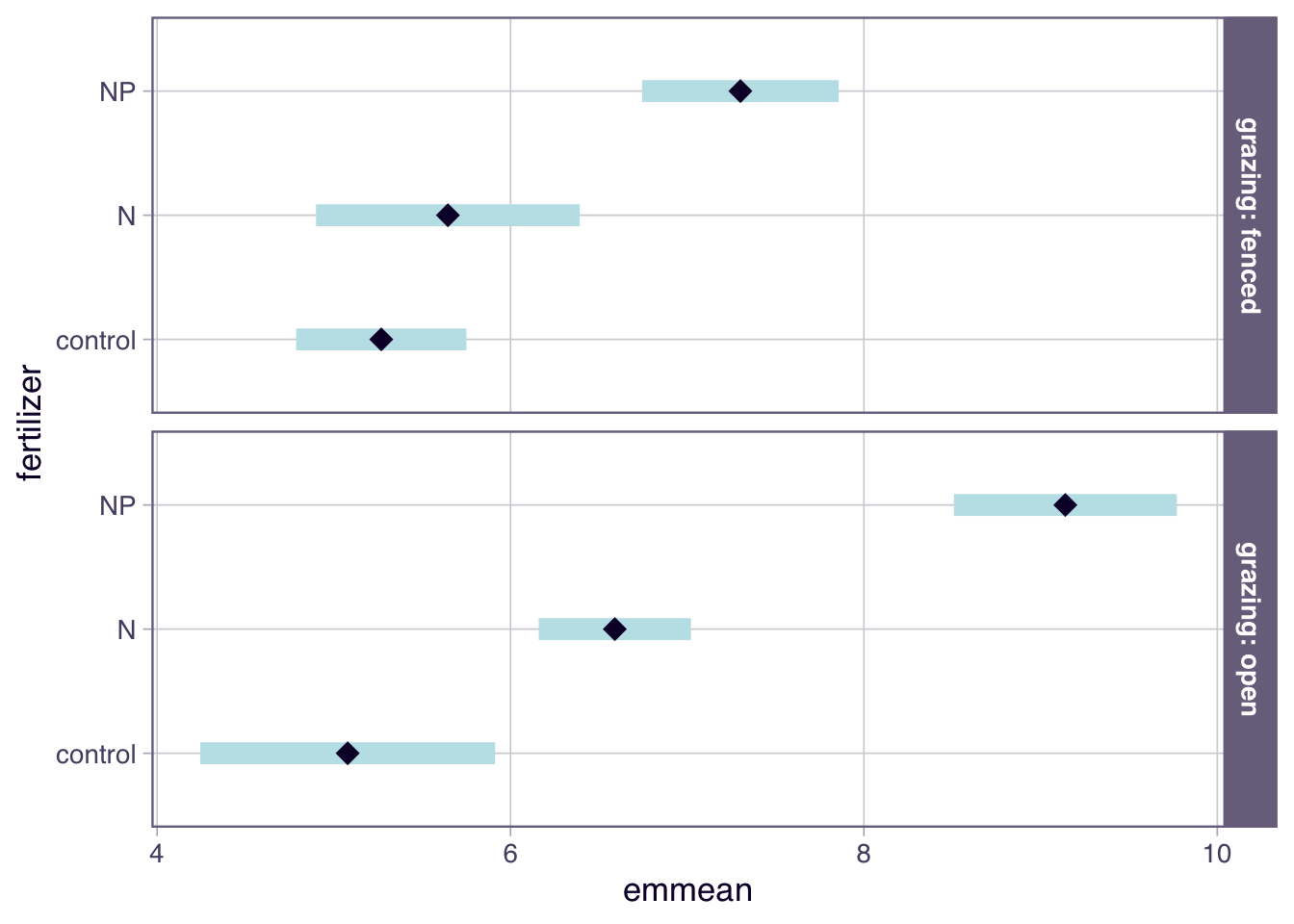
Means and comparisons within groups.pairs() and contrast() work as for a single factor (Section 2.6.3). With |, the means and comparisons are calculated separately within each level of another factor, here mean biomass per fertilizer level within each grazing treatment, compared against the control (Dunnett; pairs(emm) would give all pairwise Tukey comparisons):
grazing = fenced:
 fertilizer emmean    SE df lower.CL upper.CL
 control      5.27 0.239 46     4.79     5.75
 N            5.65 0.371 46     4.90     6.39
 NP           7.30 0.276 46     6.74     7.86

grazing = open:
 fertilizer emmean    SE df lower.CL upper.CL
 control      5.08 0.415 46     4.24     5.91
 N            6.59 0.214 46     6.16     7.02
 NP           9.14 0.313 46     8.51     9.77

Confidence level used: 0.95
contrast(emm, "trt.vs.ctrl", ref ="control")
grazing = fenced:
 contrast     estimate    SE df t.ratio p.value
 N - control     0.377 0.441 46   0.854  0.6028
 NP - control    2.032 0.366 46   5.558 <0.0001

grazing = open:
 contrast     estimate    SE df t.ratio p.value
 N - control     1.512 0.467 46   3.240  0.0043
 NP - control    4.062 0.520 46   7.815 <0.0001

P value adjustment: dunnettx method for 2 tests
plot(emm)
Conditional effects are not an interaction. At first sight, N seems to increase biomass only on open plots (+1.51, p = 0.004), but not on fenced plots (+0.38, p = 0.60, only 5 plots). But “significant in one group, not significant in the other” is not evidence for an interaction: the difference between significant and not significant is not itself significant (Gelman and Stern, 2006); whether the N effect differs between grazing treatments has to be tested directly:
 fertilizer_trt.vs.ctrl grazing_pairwise estimate    SE df t.ratio p.value
 N - control            fenced - open       -1.14 0.642 46  -1.767  0.0838
 NP - control           fenced - open       -2.03 0.635 46  -3.194  0.0025
Each row is a difference of differences: the effect of a fertilizer compared to the control (trt.vs.ctrl) within each grazing treatment, compared between the treatments (pairwise, i.e. fenced minus open; p-values not adjusted for multiple testing). The N effect is 1.14 larger on open plots, but this difference is not significant (p = 0.084): we cannot claim an interaction for N, although this does not prove that the N effects are equal. Indeed, the data were simulated with the same true N effect (+1) in both treatments. The interaction is driven by NP (difference 2.03, p = 0.0025; simulated true effects +2 on fenced and +3.5 on open plots), which is arguably more informative than any main effect.
F-tests.joint_tests() combines these comparisons into F-tests per model term; with by, separately for fenced and open plots:
joint_tests(fit, by ="grazing")
grazing = fenced:
 model term df1 df2 F.ratio p.value
 fertilizer   2  46  16.165 <0.0001

grazing = open:
 model term df1 df2 F.ratio p.value
 fertilizer   2  46  35.851 <0.0001
Without by, joint_tests() gives exactly the type III ANOVA with sum-to-zero contrasts and numeric predictors at their mean, regardless of how the model was coded, i.e. without recoding or centering (see Section 3.2.4.2 and Caution 3.1; for type II, use car::Anova(fit) instead):
Main effects in models with interaction. Means of one factor only, e.g. emmeans(fit, ~ grazing), are averaged over the other factor. The note “Results may be misleading due to involvement in interactions” is not an error, but a reminder that the grazing effect differs between fertilizer treatments.
Unequal weights. Equal weights suit designed experiments where group sizes differ by accident, as in our experiment with lost plots. In observational data, group sizes often reflect the population (e.g. a common vs. a rare habitat type), and equal weights then describe a balanced population that may not exist. To average proportional to group sizes, use weights = "proportional" (this only matters if you average over another factor):
Factor × numeric interactions.emtrends() gives the slope of the numeric predictor for each factor level, and the at argument sets the value of the numeric predictor at which the levels are compared:
airquality$fMonth =factor(airquality$Month)fitAQ =lm(Ozone ~ Temp * fMonth, data = airquality)emtrends(fitAQ, ~ fMonth, var ="Temp") # Temp slope per month
Choose this value deliberately, and within the observed range of each group (tapply(airquality$Temp, airquality$fMonth, range)); otherwise you extrapolate.
Interactions between numeric predictors. How to describe an interaction between two numeric predictors with emtrends() is shown in the section on interactions and centering (Section 2.10.3).
Empty cells. If a treatment combination has no data at all, car::Anova(type = "III") stops with “there are aliased coefficients in the model”, while type II and joint_tests() run without an error, but test hypotheses that are hard to interpret (look for reduced df, or for “(confounded)” in the output of joint_tests()). One option is to fit one mean per existing combination and to test the comparisons you are interested in with custom contrasts, here after removing the fenced N plots:
The weights in the list refer to the levels in the order printed by levels(). Simply dropping the interaction instead assumes that the effects of the two factors add up.
Reporting emmeans results. Report the estimated means or differences with their CIs (ideally as a plot, e.g. plot(emm)), which comparisons you made and how p-values were adjusted (e.g. “Dunnett-adjusted contrasts against the control, calculated with the emmeans package”), and, if you averaged over other factors, whether with equal or proportional weights.
3.2.4.3 Practical recommendations for categorical predictors
The general recommendations in Section 3.2.3.2 also apply to categorical predictors. In addition, note the following:
Reference level and contrasts: check the order of the factor levels before fitting, and set the reference level deliberately (see Section 2.6.1). With R’s default treatment contrasts, it determines what the coefficients in summary() refer to, and also what type III main-effect tests refer to. For a type III ANOVA, therefore set sum-to-zero contrasts locally, e.g. contrasts = list(fertilizer = contr.sum, grazing = contr.sum), and never interpret a type III ANOVA with treatment contrasts as main effects.
Interactions between factors: judge them by the estimated differences between conditional effects (the effects at the different levels) and their confidence intervals. The interaction test alone tells you neither where effects differ nor, if it is not significant, that they are equal. Separate tests within each group are no substitute: “significant in one group, not in the other” is not an interaction.
Unequal group sizes: with sum-to-zero contrasts, type III weights all treatment combinations equally (Section 3.2.3.2). The weights of type II depend on the cell sizes, but are not proportional to them, so type II does not give population-weighted averages either. If you want averages weighted by group sizes, e.g. in observational data where group sizes reflect the population, use emmeans with weights = "proportional" (Note 3.1), or average over the observed data with counterfactuals = (Section 9.4.1).
Small and empty cells: report the number of observations per treatment combination (table()), as combinations with very few observations (as a rough rule of thumb, fewer than about 5) give imprecise estimates, which show up as wide confidence intervals; this also makes the difference between type II and III less predictable. If a combination is empty, type III cannot be computed, and type II tests hypotheses that are hard to interpret; dropping the interaction instead assumes that the effects of the two factors add up.
Alternative: estimated marginal means. Many of these questions (conditional effects, comparisons between individual treatments, the choice of weights, empty cells) can be answered more directly with the emmeans package, which may be the better choice, as its results do not depend on contrast coding (see Note 3.1).
Reporting. An example for the methods: “Biomass was analyzed with a linear model including fertilizer, grazing and their interaction. We tested effects with type III F-tests based on sum-to-zero contrasts (car::Anova), and compared fertilizer treatments against the control within each grazing treatment with Dunnett-adjusted contrasts (emmeans).” If you use type II, write “type II F-tests (car::Anova)” instead. For how to report estimated means and comparisons, see the end of Note 3.1.
Mixed models: the type III ANOVA of the lmerTest package is an exception, as it does not depend on the coding (see Caution 4.2).
CautionExercise — Does coding matter?
Use the ToothGrowth data (tooth length of guinea pigs for two supplements and three doses of vitamin C), with dose as a factor (ToothGrowth$fdose = factor(ToothGrowth$dose)).
Fit len ~ supp * fdose. Compare the type II ANOVA with the type III ANOVA under the default treatment contrasts and under sum-to-zero contrasts. Which test for supp is the odd one out, and which hypothesis does it test? (Use the zero-point rule.)
Remove the rows c(1:6, 31:33, 41:44) and repeat. Does the type I ANOVA now depend on the order of the predictors? Do type II and type III with sum-to-zero contrasts still agree?
Make VC (ascorbic acid) the reference level of supp. Use emmeans to estimate the difference between OJ and VC at each dose, and write one sentence that you could put in the results section of a paper.
(Optional) Now treat dose as numeric and compare len ~ supp * dose with len ~ supp * I(dose - 1). At which dose is the supp main effect estimated and tested in each case?
The design is balanced, and type II and type III with sum-to-zero contrasts are identical. Type III with treatment contrasts gives a different result for supp (and fdose): it tests the supp effect at the reference dose of 0.5 mg, not averaged over all doses.
Now the type I ANOVA depends on the order (supp is n.s. when added first, but significant when added after dose). Type II and type III with sum-to-zero contrasts no longer agree, because they weight the doses differently (type III equally, type II depending on the number of animals per dose, but not proportional to it), but both indicate an effect of supp. Type III with treatment contrasts (supp at dose 0.5) is not significant.
Possible sentence: “Orange juice increased tooth length compared to ascorbic acid at a dose of 1 mg/day (difference 5.6 mm, p = 0.005), while the differences at 0.5 mg/day (2.5 mm, p = 0.27) and 2 mg/day (-0.1 mm, p = 0.96) were not significant.”
4. Numeric dose
fitNum =lm(len ~ supp * dose, data = tg2)fitNum1 =lm(len ~ supp *I(dose -1), data = tg2)coef(fitNum)["suppOJ"]
  suppOJ
4.161298
coef(fitNum1)["suppOJ"]
  suppOJ
2.298439
car::Anova(fitNum, type ="III")["supp", ]
Anova Table (Type III tests)

Response: len
     Sum Sq Df F value Pr(>F)
supp 37.285  1  2.2608   0.14
car::Anova(fitNum1, type ="III")["supp", ]
Anova Table (Type III tests)

Response: len
     Sum Sq Df F value  Pr(>F)
supp 49.588  1  3.0067 0.09008 .
---
Signif. codes:  0 '***' 0.001 '**' 0.01 '*' 0.05 '.' 0.1 ' ' 1
In the first model, the supp effect is estimated and tested at dose = 0, a dose that was never applied. In the second model, it is estimated and tested at a dose of 1 mg/day. Note that “centering” doesn’t necessarily mean subtracting the mean: the value you subtract defines the hypothesis, so choose a value that is meaningful for your question. Note also that the mean dose changed when we removed rows, so centering on the mean would have changed the type III test as well.
3.2.5 Correcting partitions for complexity
A last problem is that while the calculation of the p-value in the LRT (see Section 3.2.2) corrects for the fact that model components with more complexity (df) will always tend to explain more variance, the naive variance components / R2 that we calculate in the ANOVA are uncorrected for this problem.
We can see this when a model with a separate mean per day is fitted:
m =lm(Ozone ~as.factor(Day) , data = airquality)anova(m)
Analysis of Variance Table

Response: Ozone
               Df Sum Sq Mean Sq F value Pr(>F)
as.factor(Day) 30  41931 1397.69  1.4277 0.1039
Residuals      85  83212  978.97
The ANOVA tells us that this variable Day explains around 1/3 of the variation in the data, although it is not even significant. Thus, the “raw” SumSq / R2 calculations in an ANOVA are generally too high.
Because of this problem, the summary.lm() function reports raw and adjusted R2 for each model. The adjusted R2 tries to correct the R2 for the complexity of the model.
Here, we see that the adjusted R2 is considerably lower than the raw R2, even though not zero. For a simple LM and a type I ANOVA, a first-order solution would thus be to re-calculate the R2 components with adjusted values: compute the adjusted R2 for the sequence of nested models, and use the differences between them as components. For example, adding Day to a model with Wind increases the raw R2 by 0.23, but the adjusted R2 only by 0.08, while the adjustment hardly changes the R2 of Wind, which uses only 1 df (0.36 raw and adjusted):
R2 =function(f) summary(lm(f, data = airquality))$r.squaredadjR2 =function(f) summary(lm(f, data = airquality))$adj.r.squaredR2(Ozone ~ Wind) # raw R2 of Wind
[1] 0.3618582
R2(Ozone ~ Wind +as.factor(Day)) -R2(Ozone ~ Wind) # raw gain from Day
[1] 0.229653
adjR2(Ozone ~ Wind) # adjusted R2 of Wind
[1] 0.3562605
adjR2(Ozone ~ Wind +as.factor(Day)) -adjR2(Ozone ~ Wind) # adjusted gain from Day
[1] 0.08449894
For more complex models in general (mixed models, hierarchical models), reliably adjusting R2 components for complexity in an ANOVA is very complicated. I would recommend that
If you report raw components (which is the default in most papers), consider that this is a description of your model, not an inference about the true variance created by the respective factor, and include in your interpretation that variables or model components with more df will always tend to explain more variance
A possibility is to calculate variance explained via a cross-validation on hold-out data (Section 8.4). If a sensible cross-validation can be set up (which is not trivial if there are cluster / correlation structures in your data), this is a relatively stable metric of variance explained.
Alternatively, you could adjust R2 by a null expectation, similar to the parametric bootstrap for the LRT (Section 3.2.2). However, because you subtract what is expected under H0, this will be a conservative estimate.
3.3 Relationship between lm and other hypotheses tests
ANOVA is just one example of the close relationship between the lm and other null hypothesis significance tests. ANOVA can either be seen as a special test (traditional view), or as a special evaluation of a fitted lm (modern view). I would recommend taking the modern view, as it easily generalizes to GLMs and other more advanced regression models such as GLMMs. An ANCOVA, for example, is simply a linear model with a factor and a numeric covariate, e.g. lm(y ~ treatment + covariate), tested with car::Anova().
It is interesting to consider more generally which hypothesis tests can be obtained by looking at certain results or tests on the linear model. As you can see in the table below, there are many classical hypothesis tests that are equivalently or nearly equivalently tested by a linear model.
Common statistical tests with linear models
Hypothesis
R function
Equivalent linear model
Two groups differ in their means
unpaired t.test
t.test(y_1, y_2, var.equal = TRUE)
lm(c(y_1, y_2)~c(g_1, g_2))
Two groups differ in their means
paired t.test
t.test(y_1, y_2, paired = TRUE)
lm(y_2-y_1~1)
y depends on continuous x
Pearson correlation
cor.test(x, y)
lm(y~x), identical p-value for the slope
y depends on continuous x
Spearman correlation
cor.test(x, y, method = "spearman")
lm(rank(y)~rank(x)) note: only near-equivalent.
y differs between groups
One-way ANOVA
aov(y~group)
lm(y~group) with subsequent ANOVA
Based on this, one could think it doesn’t matter then if we use a regression model or a hypothesis test. However, the advantage of the regression model is that
It provides a richer output
It provides the same output for all cases, with clear ideas about how to check residuals etc.
It allows us to adjust for the effects of covariates
3.4 Take-home messages
Tip
An ANOVA is not a model but a test that is run on a fitted model: it asks how much the fit improves when a term is added, and whether this improvement is larger than expected if the term had no effect.
With collinear or unbalanced data, the type I ANOVA depends on the order of the terms in the formula. Use type II if the model has no interaction; with interactions, think about which hypothesis you want to test. Report which type you used.
A balanced setup does not guarantee balanced predictors: variables that depend on the behavior of the study objects can be associated with the design variables. Check with table() or plots before you read an ANOVA table.
The coding of a factor never changes the fitted model, but it changes type III tests of terms that are part of an interaction. With type III, use sum-to-zero contrasts and center numeric predictors in interactions, or use emmeans::joint_tests(), which does not depend on the coding.
If the model has an interaction, describe the effect of one predictor at the levels (or values) of the other, with estimates and confidence intervals (emmeans). “Significant in one group, not significant in the other” is not evidence for an interaction; test the difference of the effects.
Raw sums of squares and R2 fractions describe your fitted model, are not the true importance of a predictor, and are too high for terms with many df (e.g. a factor with many levels). For a simple lm use the adjusted R2; for more complex models report the raw fractions as a description only, or use cross-validation on hold-out data.
3.5 Case studies
3.5.1 Plant height
Let’s look at our plant height case study from the chapter on linear regression (see the plant height exercise, Caution 2.3). Which type of ANOVA should you run to analyze the model? Compare results to “less appropriate” alternatives.
library(EcoData)fit =lm(loght ~ temp * lat, data = plantHeight)summary(fit)
Call:
lm(formula = loght ~ temp * lat, data = plantHeight)

Residuals:
     Min       1Q   Median       3Q      Max
-1.97905 -0.45112  0.01062  0.42852  1.74054

Coefficients:
              Estimate Std. Error t value Pr(>|t|)
(Intercept)  2.917e-01  5.617e-01   0.519    0.604
temp         2.596e-02  2.040e-02   1.273    0.205
lat         -8.948e-03  9.711e-03  -0.921    0.358
temp:lat     7.738e-05  3.061e-04   0.253    0.801

Residual standard error: 0.6869 on 174 degrees of freedom
Multiple R-squared:  0.2504,    Adjusted R-squared:  0.2375
F-statistic: 19.37 on 3 and 174 DF,  p-value: 6.95e-11
TipSolution
This is the case of collinear observational data from Section 3.2.3: temperature and latitude are strongly correlated,
cor(plantHeight$temp, plantHeight$lat)
[1] -0.9249304
and the model contains their interaction. We therefore center the predictors, so that type III tests each main effect at the mean of the other predictor (type II is not affected by centering):
plantHeight$cTemp =scale(plantHeight$temp, scale =FALSE) # only center variableplantHeight$cLat =scale(plantHeight$lat, scale =FALSE)fit =lm(loght ~ cTemp * cLat, data = plantHeight)summary(fit)
Call:
lm(formula = loght ~ cTemp * cLat, data = plantHeight)

Residuals:
     Min       1Q   Median       3Q      Max
-1.97905 -0.45112  0.01062  0.42852  1.74054

Coefficients:
              Estimate Std. Error t value Pr(>|t|)
(Intercept)  4.694e-01  6.771e-02   6.932 7.78e-11 ***
cTemp        2.838e-02  1.543e-02   1.839   0.0676 .
cLat        -7.700e-03  8.020e-03  -0.960   0.3383
cTemp:cLat   7.738e-05  3.061e-04   0.253   0.8007
---
Signif. codes:  0 '***' 0.001 '**' 0.01 '*' 0.05 '.' 0.1 ' ' 1

Residual standard error: 0.6869 on 174 degrees of freedom
Multiple R-squared:  0.2504,    Adjusted R-squared:  0.2375
F-statistic: 19.37 on 3 and 174 DF,  p-value: 6.95e-11
The type II ANOVA discards shared fractions between main effects. Note that because of the high collinearity, R2 assigned to each predictor is extremely low.
The type III ANOVA, unlike type II, also adjusts the main effects for the interaction. Here, this changes the sums of squares of the main effects only slightly (temp somewhat lower, lat essentially unchanged), but temp now just misses the 0.05 threshold. The difference arises only because the model contains the (here clearly non-significant, p = 0.80) interaction: without it, type II and III are identical (temp p = 0.046). With r = -0.92 between temp and lat, even the centered interaction term is correlated with the main effects (r = 0.53 with temp and -0.47 with lat), so adjusting for it, as type III does, changes their tests (Section 3.2.3.2). Both types are defensible, and the difference mainly shows that the data cannot clearly separate the effects of temperature and latitude, so don’t overinterpret the 0.05 threshold.
Generally, because of its order dependence under collinearity, you should be hesitant to run a type I ANOVA. However, there can be reasons to do it. For example, in this case, you may argue that temperature is a more plausible or mechanistic predictor than latitude. For that reason, you could say that you want to explain everything by temperature first, and then see if latitude can explain something on top of temperature. If that is your goal, you can also run a type I ANOVA.
As a last, add-on, let’s see what happens when we use the non centered variables:
fit2 =lm(loght ~ temp * lat, data = plantHeight)print(car::Anova(fit2, type ="II"))
Anova Table (Type II tests)

Response: loght
          Sum Sq  Df F value  Pr(>F)
temp       1.888   1  4.0014 0.04702 *
lat        0.421   1  0.8922 0.34620
temp:lat   0.030   1  0.0639 0.80074
Residuals 82.089 174
---
Signif. codes:  0 '***' 0.001 '**' 0.01 '*' 0.05 '.' 0.1 ' ' 1
print(car::Anova(fit2, type ="III"))
Anova Table (Type III tests)

Response: loght
            Sum Sq  Df F value Pr(>F)
(Intercept)  0.127   1  0.2696 0.6043
temp         0.764   1  1.6198 0.2048
lat          0.401   1  0.8490 0.3581
temp:lat     0.030   1  0.0639 0.8007
Residuals   82.089 174
Type II is unchanged, but type III changes: the main effect of temp is now tested at lat = 0 (the equator) and vice versa, which is a different and, for this dataset, rather meaningless hypothesis. This is why you should center numeric predictors before a type III ANOVA (Caution 3.1).